

Enterprise knowledge is usually not missing. It is scattered.
In SAP organizations, important know-how is often distributed across SharePoint folders, process manuals, interface descriptions, support runbooks, operating procedures, project handover documents, onboarding materials, internal wikis and technical guides.
The documents exist, but users still struggle to find the right answer at the right moment. A new team member needs to understand a process. A support consultant needs to resolve a recurring error. A key user needs to know which procedure applies.
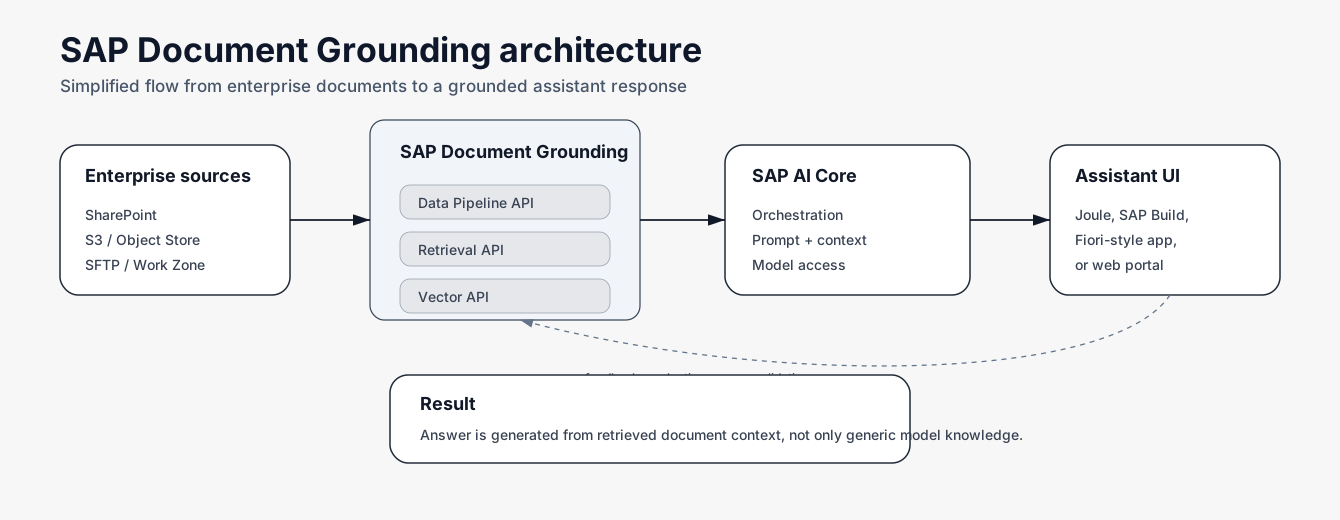
SAP Document Grounding with SAP AI Core helps solve this problem. It connects enterprise documents with AI orchestration so users can ask questions in natural language and receive answers based on approved internal content. The result is not a generic chatbot – it is a business knowledge assistant grounded in company-specific documentation.
Why Document Grounding Matters
Large language models can generate fluent answers, but enterprise users need more than fluent text. They need answers that are relevant to their process, based on current internal documentation, connected to trusted sources and easy to verify.
Without grounding, an AI assistant may provide an answer that sounds reasonable but does not reflect the company process, system landscape, escalation path or internal rule.
Document grounding changes the pattern. Before the answer is generated, the user question is matched against internal documents. The most relevant fragments are retrieved and provided as context for the AI workflow. The final answer is therefore based on company-specific knowledge, not only on general model knowledge.
This pattern is especially valuable for SAP environments because SAP processes are rarely generic. They include customer-specific configuration, custom interfaces, country-specific rules, internal operating procedures and project-specific decisions.
The Business Problem
Most enterprises do not have a documentation problem. They have an access problem.
Documentation is stored in many places. Some documents are outdated. Some are duplicated. Some are accurate but too long to search manually. Some are known only by people who were part of the original implementation.
Typical symptoms for SAP teams:
- Slow onboarding of new consultants and business users
- Repeated questions to senior experts
- Inconsistent answers across teams
- Long search time in SharePoint or internal portals
- Missing connection between process questions and technical documentation
- Support teams solving the same issue repeatedly
- Outdated knowledge transfer materials
- Unclear ownership of process knowledge
- Difficulty finding the correct escalation path
The cost is not only time. It also affects process quality, support consistency and business continuity. A grounded AI assistant helps users access knowledge directly, while keeping the original repository as the source of truth.
What Codemine Builds
Codemine builds SAP-oriented document grounding solutions that turn enterprise documents into an interactive knowledge layer. The assistant can be used by support teams, key users, consultants, process owners, onboarding teams and application management teams.
Typical solution types:
- Onboarding assistant
- SAP support assistant
- Process knowledge assistant
- Interface error explanation assistant
- Joule-connected document search
- Internal helpdesk companion
- Compliance procedure assistant
- Project handover assistant
- Application management knowledge base
- SAP competence center assistant
The assistant does not replace the documentation. It makes the documentation easier to use.
Example Scenario: Onboarding Assistant
A new employee joins an SAP support or process team. Normally, onboarding requires several knowledge transfer sessions, long document reviews and repeated questions to experienced team members.
With document grounding, the user can ask direct questions:
- How does this process work from start to end?
- Which documents should I read first?
- What are the most common exceptions?
- Which team owns this process?
- What should I check before creating an incident?
- What is the escalation path for this issue?
- Which system transactions or applications are involved?
The assistant searches approved internal content and returns a structured answer with source references. The user learns faster, and senior experts spend less time repeating the same explanations.
Example Scenario: SAP Support Assistant
SAP support teams often work with recurring questions and recurring issues. The answer may be documented, but it is usually spread across troubleshooting guides, ticket history, runbooks, interface specifications, AIF documentation, IDoc guides, internal wikis and escalation matrices.
A document-grounded assistant can help support teams answer questions such as:
- What does this error mean?
- Was this error already described in our documentation?
- What is the likely root cause?
- Which resolution steps are recommended?
- Is this a master data, mapping, authorization or process issue?
- Which team should handle this?
- What should I check before escalating?
The response can include a short explanation, recommended checks, source documents, owner information and next steps. This reduces manual search effort and helps new support consultants work more independently.
Example Scenario: Interface and Integration Knowledge Assistant
Integration landscapes are often complex. A single interface can involve SAP S/4HANA, SAP AIF, IDocs, APIs, middleware, file transfers, external systems and business validation rules.
When an interface error occurs, the support team needs to understand both the technical message and the business context. A grounded assistant can help by connecting error handling documentation, mapping specifications, interface descriptions, runbooks and escalation rules.
Example questions:
- What does this interface error mean?
- Which field mapping is relevant here?
- Is this a source system issue or SAP validation issue?
- Which document describes the expected payload?
- What should be checked before restarting the message?
- Which team owns this interface?
This type of assistant is a strong first use case because the business value is concrete and the knowledge is usually already documented somewhere.
How the Solution Works
1. Connect Enterprise Repositories
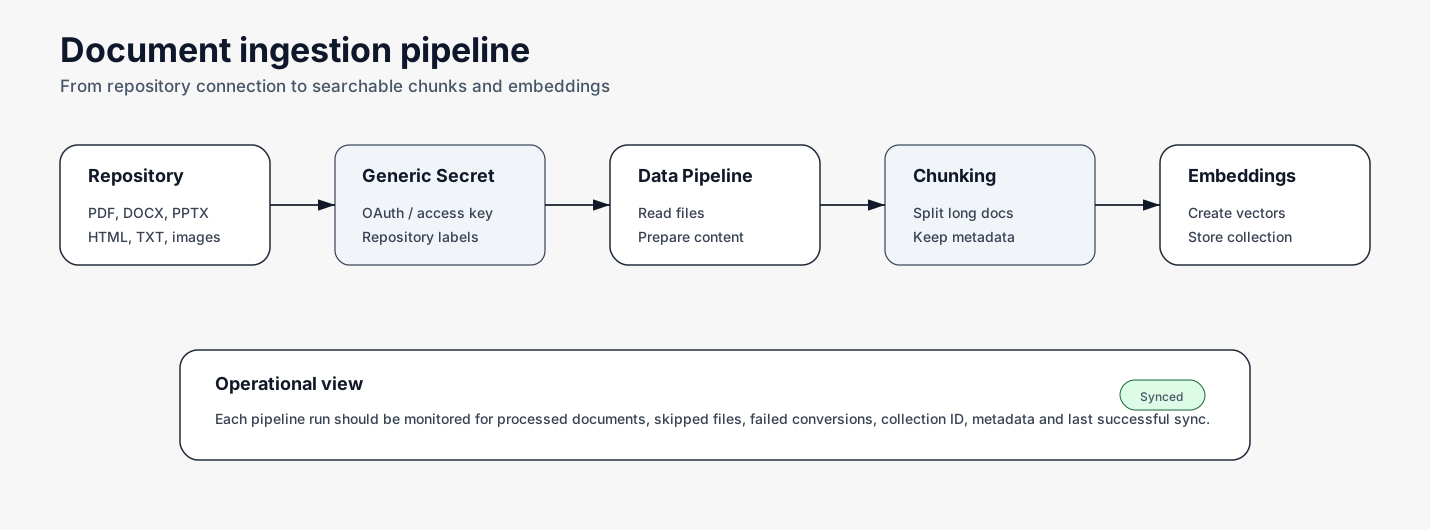
The solution starts by connecting the repositories where knowledge already lives. The goal is not to move all documents into a new system – the goal is to make existing knowledge available for reliable retrieval.
Typical sources include:
- Microsoft SharePoint
- AWS
- SFTP
- Controlled file repositories
2. Prepare and Ingest Documents
After the repository connection is configured, the documents are ingested into the grounding pipeline. The pipeline prepares the content for retrieval – extracting text, splitting documents into smaller fragments, preserving metadata and creating embeddings.
This step is important because enterprise documents are often long and multi-topic. A user question usually needs one relevant section, not the entire document. Good ingestion design also considers document ownership, language, version, validity period, business area and sensitivity level.
3. Create Knowledge Collections
Processed document fragments are stored as searchable collections. A collection can represent a clear knowledge domain:
- Finance process documentation
- Integration support manuals
- SAP troubleshooting guides
- Onboarding documents
- Procurement procedures
- Logistics exception handling
- HR process knowledge
- Internal SAP architecture guidelines
- Project handover documentation
Example metadata per document fragment: process area, document type, business owner, system landscape, country, language, document version, validity date, sensitivity level, source repository. A well-designed metadata model improves retrieval quality and supports governance.
4. Retrieve Relevant Context
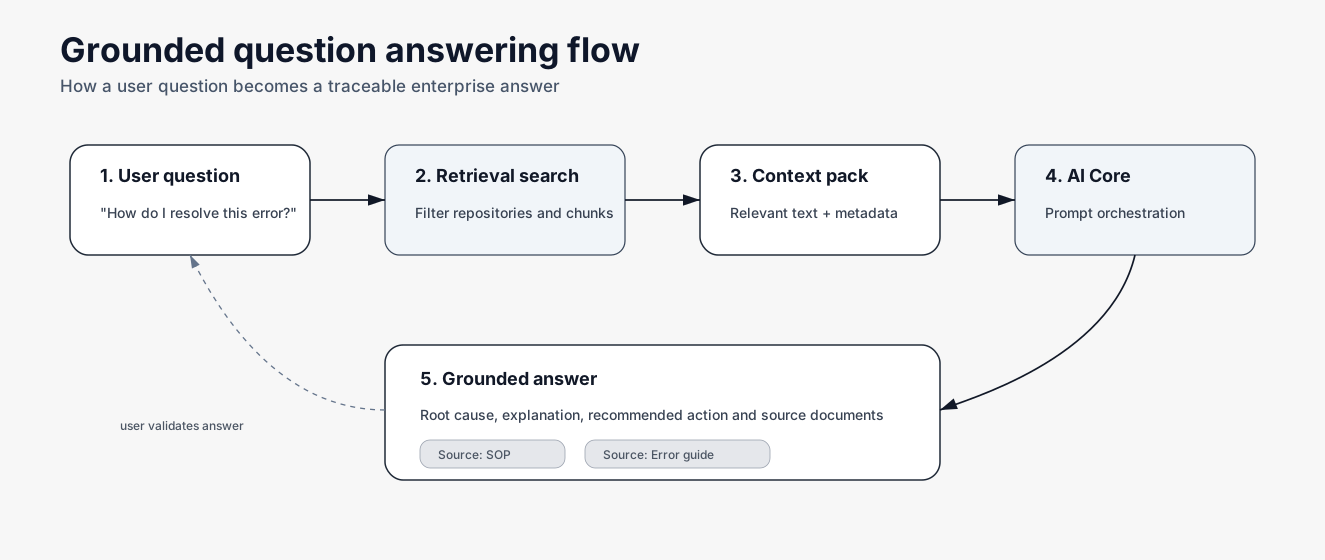
When a user asks a question, the system first searches the grounded document collections. The retrieval layer identifies the most relevant chunks based on meaning, keywords, metadata and search scope.
A strong retrieval strategy should consider user intent, semantic similarity, source priority, document metadata, access rules, language, document freshness, business area filters and process-specific search scope.
5. Generate the Grounded Answer
SAP AI Core orchestration combines the user question, retrieved content, model configuration and response rules into a controlled AI workflow. The model receives the right context and generates a structured answer that includes a direct explanation, recommended next steps, source references, confidence or limitation notes, links to relevant documents and the escalation path if needed.
Technical Building Blocks
SAP AI Core
SAP AI Core provides the foundation for AI orchestration and runtime execution. In a document grounding scenario, it coordinates the flow between the user request, grounding layer, model and final response. It helps enterprises move from isolated AI experiments to controlled architecture patterns.
Key responsibilities: AI orchestration, model access, runtime execution, lifecycle management, connection with SAP AI Launchpad, enterprise-ready operation and scalable AI application patterns.
SAP Document Grounding Service
SAP Document Grounding service provides the retrieval and grounding layer for enterprise documents. It enables document ingestion, vector-based search and retrieval of relevant content for AI workflows.
Key capabilities: repository integration, data pipeline for document ingestion, vector representation of document chunks, retrieval of relevant context, metadata-based filtering, support for conversational search patterns and integration with AI assistant scenarios. The service helps ensure that generated answers are based on enterprise knowledge rather than only on generic model output.
SAP AI Launchpad
SAP AI Launchpad supports administration and operational visibility for SAP AI Core scenarios. In implementation work it helps with checking service setup, managing AI Core resources, maintaining configurations, working with secrets and repository connections, monitoring scenarios and supporting lifecycle operations.
Joule Integration
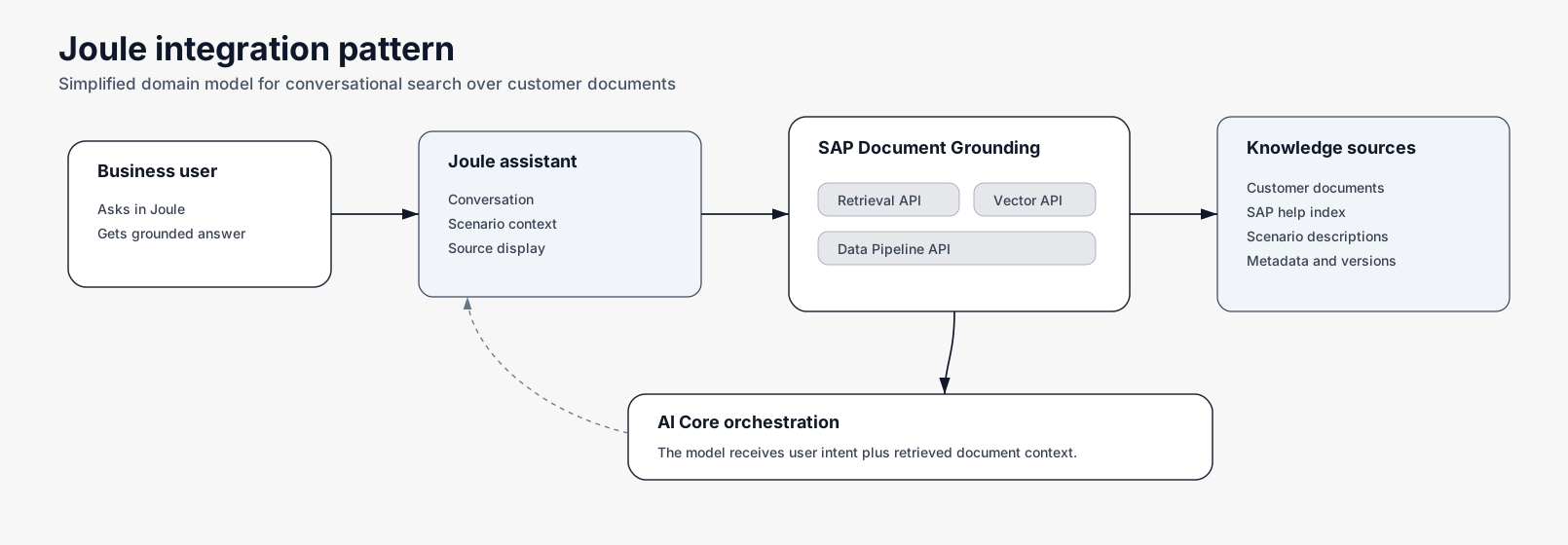
Document grounding can support Joule-related conversational scenarios. A typical pattern:
- The user asks a question in Joule.
- Joule sends the query to the retrieval layer.
- Document Grounding returns relevant document context.
- SAP AI Core orchestrates the model interaction.
- Joule displays a grounded answer with source context.
This allows companies to provide a natural conversational search experience based on their own documentation.
Custom Frontend
Not every use case needs Joule from day one. Many companies start with a focused custom UI because it is faster to validate business value. Possible frontends include internal web applications, SAP Build applications, Fiori-style UIs, support cockpits, interface monitoring dashboards, service desk extensions and knowledge portals.
A good assistant UI should include: question input, structured answer, source references, recommended next steps, feedback buttons, escalation option, link to original document and process or role filters.
Architecture at a Glance
The architecture connects document repositories, ingestion pipelines, searchable collections, retrieval APIs, SAP AI Core orchestration and user-facing assistants.
Typical flow:
- Connect document sources.
- Ingest and prepare content.
- Create searchable knowledge collections.
- Retrieve relevant document fragments.
- Generate a grounded answer.
- Show sources and next steps to the user.
This architecture can support both lightweight prototypes and production-grade enterprise AI scenarios.
Benefits
- Faster onboarding – New team members can understand processes faster and ask questions directly.
- Lower support effort – Repeated questions can be answered without involving senior experts every time.
- Better use of documentation – Existing documents become active knowledge assets instead of static files.
- More consistent answers – Users receive guidance based on approved materials.
- Better process compliance – The assistant can guide users toward official procedures and escalation paths.
- Improved transparency – Source references help users verify the answer.
- Faster incident resolution – Support teams can find troubleshooting steps faster.
- Reduced dependency on key people – Expert knowledge becomes easier to scale across teams.
What Makes a Good First Project
A good first document grounding project should be focused. The best starting point is not the biggest repository – it is a business area where users ask the same questions repeatedly and where documentation is already available.
Good starting examples:
- SAP support handbook
- AIF error resolution guide
- Onboarding guide for new consultants
- Process manual for finance operations
- Integration runbook
- Project handover documentation
- Internal SAP architecture guide
- Standard operating procedures
Avoid starting with uncontrolled document archives, outdated repositories, documents without owners, unclear process scope, highly sensitive content without governance or use cases where answers cannot be validated.
Governance Considerations
Document grounding is not only a technical implementation. It also requires content governance. Key questions to address:
- Who owns the documents?
- Which documents are valid?
- How often are they updated?
- Who can access which knowledge?
- Should answers include source references?
- How should wrong answers be reported?
- How is sensitive content handled?
- Which repositories are allowed?
- Which use cases require human approval?
- How is quality measured over time?
Codemine helps define both the technical architecture and the operating model.
Security and Access Control
A document-grounded assistant should not expose content that the user is not allowed to access. A proper implementation should consider:
- Repository permissions
- Identity and role concept
- Tenant separation
- Secure secrets handling
- Auditability
- Logging strategy
- Sensitive document classification
- Data retention requirements
- Source visibility
Grounded AI is only valuable when it is trusted. We design document grounding scenarios with security, source control and operational governance from the beginning.
Example Assistant Response
User question: What are the possible errors in our custom invoice process and how should they be handled?
Grounded answer: The documentation describes three common error categories for this process.
1. Missing Master Data
The most common issue is missing or inconsistent business partner, company code or tax configuration.
Recommended action:
- Check partner mapping
- Validate company code assignment
- Confirm tax code configuration
- Retry after master data correction
2. Interface Mapping Issue
The error may occur when incoming fields do not match the expected target structure.
Recommended action:
- Check the mapping guide
- Compare the incoming payload with the expected structure
- Verify whether the interface version is correct
- Escalate to the integration team if the mapping is outdated
3. Posting Rule Exception
The document also describes cases where the invoice cannot be posted because a business rule is not satisfied.
Recommended action:
- Check posting rule documentation
- Confirm whether manual approval is required
- Follow the escalation path for finance exceptions
Sources: Invoice Process Support Guide, Interface Mapping Documentation, Finance Exception Handling SOP.
FAQ
Is document grounding the same as a normal chatbot?
No. A normal chatbot may answer from general model knowledge. A grounded assistant retrieves relevant internal documents first and uses them as context for the answer.
Does document grounding replace SharePoint?
No. SharePoint or another repository can remain the source of truth. Document grounding makes the content easier to search and use.
Can the assistant show source documents?
Yes. A good implementation should show source references so users can verify the answer.
Can this work with Joule?
Yes. Document grounding can support conversational search patterns and can be used in Joule-related scenarios.
Can this work without Joule?
Yes. Many first implementations use a custom frontend, SAP Build application, internal portal or support cockpit.
What documents should we start with?
Start with focused, high-value documentation such as onboarding guides, support runbooks, error handling manuals or process SOPs.
How long does a first prototype take?
A focused prototype can usually be designed around one clear use case and one controlled document set. The exact effort depends on repository access, document quality, security requirements and target UI.
Build an AI Assistant That Understands Your Enterprise Knowledge
Your company already has valuable documentation. The challenge is making it accessible at the moment users need it. Codemine helps you design and implement document-grounded AI assistants using SAP AI Core and SAP Document Grounding service.
Start with one focused use case: onboarding, SAP support, interface error handling, process guidance or internal knowledge transfer.
Book a discovery session and identify the first document grounding use case for your SAP organization.


